> ## Documentation Index
> Fetch the complete documentation index at: https://cometchat-22654f5b-feature-ios-multimedia-attachments.mintlify.site/llms.txt
> Use this file to discover all available pages before exploring further.
# Message Bubble Styling
> Customize CometChat iOS UI Kit message bubbles with incoming and outgoing styles, borders, corner radius, and per-message-type styling.
| Field | Value |
| ----------------- | -------------------------------------------------------------------------------------------------------------------------------------------------------------------------------------------- |
| Platform | iOS UI Kit |
| Incoming Style | `CometChatMessageBubble.style.incoming` |
| Outgoing Style | `CometChatMessageBubble.style.outgoing` |
| Global Properties | `backgroundColor`, `borderWidth`, `borderColor`, `cornerRadius` |
| Bubble Types | `textBubbleStyle`, `imageBubbleStyle`, `videoBubbleStyle`, `audioBubbleStyle`, `fileBubbleStyle`, `pollBubbleStyle`, `linkPreviewBubbleStyle`, `deleteBubbleStyle`, `aiAssistantBubbleStyle` |
| Action Bubble | `CometChatMessageBubble.actionBubbleStyle` |
## Overview
The MessageBubble styling API allows developers to customize the appearance of incoming and outgoing message bubbles globally or at the component level. This includes various message types such as text, image, video, audio, file, and document bubbles.
There are two primary classes for styling message bubbles:
* **CometChat Incoming Message Bubble Style**
* **CometChat Outgoing Message Bubble Style**
Both classes provide properties for customizing background color, border, corner radius, and specific styles for individual message types.
***
## Properties
### Global Styling (Static Variables)
| Property | Description |
| ---------------------- | ------------------------------------------- |
| **backgroundColor** | The background color for message bubbles |
| **backgroundDrawable** | A background image for message bubbles |
| **borderWidth** | The width of the border for message bubbles |
| **borderColor** | The color of the border for message bubbles |
| **cornerRadius** | The corner radius for message bubbles |
### Specific Message Type Styles
| Property | Description |
| ----------------------- | ---------------------------------- |
| **textBubbleStyle** | Style for text message bubbles |
| **imageBubbleStyle** | Style for image message bubbles |
| **videoBubbleStyle** | Style for video message bubbles |
| **audioBubbleStyle** | Style for audio message bubbles |
| **fileBubbleStyle** | Style for file message bubbles |
| **documentBubbleStyle** | Style for document message bubbles |
***
## Customization Examples
### Customizing Incoming Message Bubble
The following code snippet shows how to customize the incoming message bubble style:
```swift lines theme={null}
// Customize incoming message bubble appearance
CometChatMessageBubble.style.incoming.backgroundColor = UIColor(hexString: "#F76808")
CometChatMessageBubble.style.incoming.borderWidth = 2
CometChatMessageBubble.style.incoming.borderColor = UIColor.black
```
### Customizing Outgoing Message Bubble
The following code snippet shows how to customize the outgoing message bubble style:
```swift lines theme={null}
// Customize outgoing message bubble appearance
CometChatMessageBubble.style.outgoing.backgroundColor = UIColor(hexString: "#F76808")
CometChatMessageBubble.style.outgoing.borderWidth = 2
CometChatMessageBubble.style.outgoing.borderColor = UIColor.black
```
***
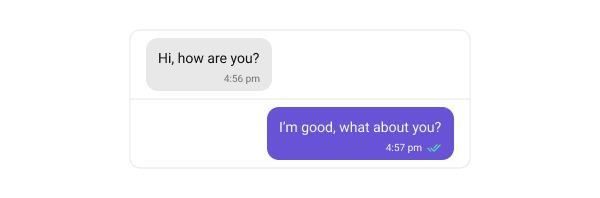
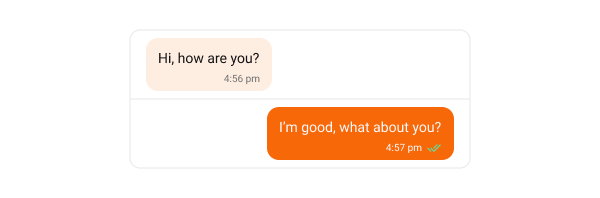
## Text Bubble
Text bubbles display plain text messages, which are the most common message type.
The following code snippet shows how to customize the text message bubble:
```swift lines theme={null}
// Customize text bubble for incoming messages
CometChatMessageBubble.style.incoming.textBubbleStyle.backgroundColor = UIColor(hexString: "#FEEDE1")
// Customize text bubble for outgoing messages
CometChatMessageBubble.style.outgoing.textBubbleStyle.backgroundColor = UIColor(hexString: "#F76808")
```
**Default**
 **Customization**
 ***
## Image Bubble
Image bubbles display messages with images.
The following code snippet shows how to customize the image message bubble:
```swift lines theme={null}
// Customize image bubble for incoming messages
CometChatMessageBubble.style.incoming.imageBubbleStyle.backgroundColor = UIColor(hexString: "#FEEDE1")
// Customize image bubble for outgoing messages
CometChatMessageBubble.style.outgoing.imageBubbleStyle.backgroundColor = UIColor(hexString: "#F76808")
```
**Default**
***
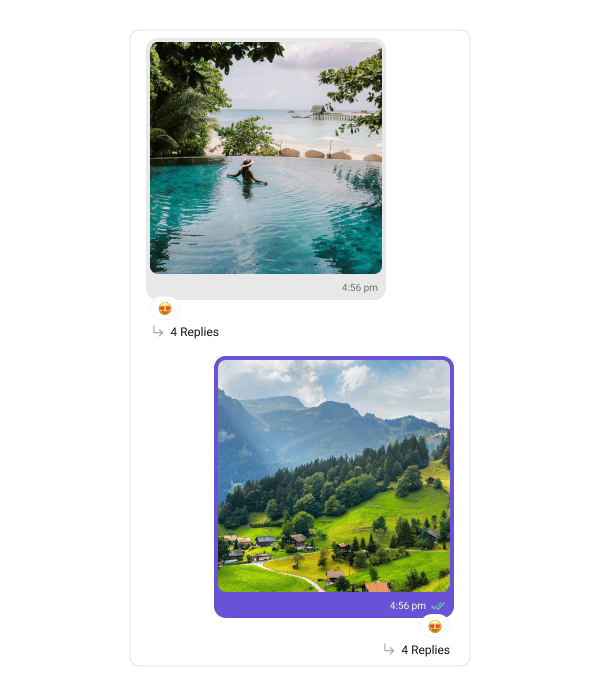
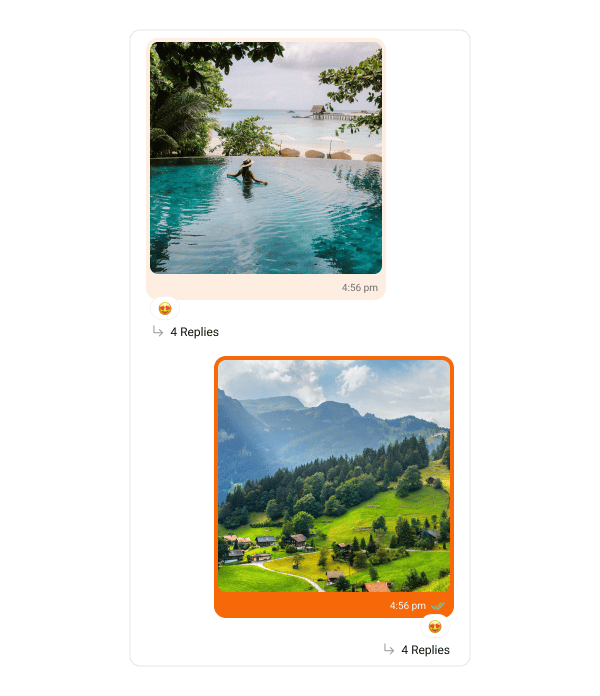
## Image Bubble
Image bubbles display messages with images.
The following code snippet shows how to customize the image message bubble:
```swift lines theme={null}
// Customize image bubble for incoming messages
CometChatMessageBubble.style.incoming.imageBubbleStyle.backgroundColor = UIColor(hexString: "#FEEDE1")
// Customize image bubble for outgoing messages
CometChatMessageBubble.style.outgoing.imageBubbleStyle.backgroundColor = UIColor(hexString: "#F76808")
```
**Default**
 **Customization**
 ***
## Video Bubble
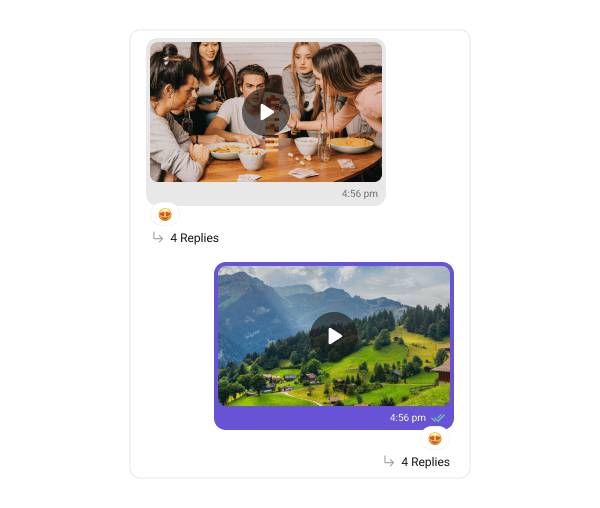
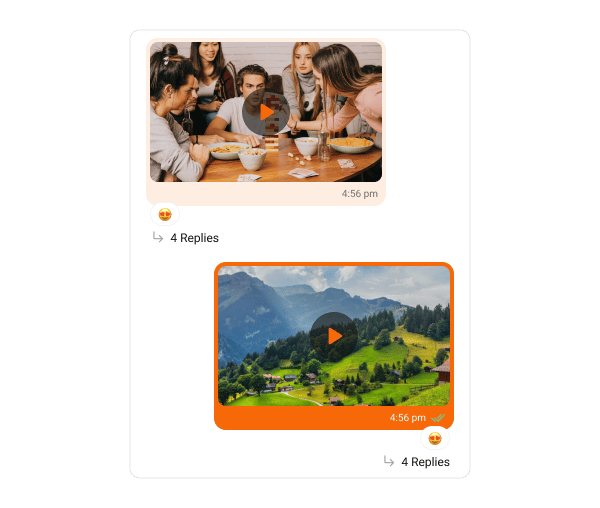
Video bubbles display messages with video clips.
The following code snippet shows how to customize the video message bubble:
```swift lines theme={null}
// Customize video bubble for incoming messages
CometChatMessageBubble.style.incoming.videoBubbleStyle.backgroundColor = UIColor(hexString: "#FEEDE1")
CometChatMessageBubble.style.incoming.videoBubbleStyle.playButtonTint = UIColor(hexString: "#F76808")
// Customize video bubble for outgoing messages
CometChatMessageBubble.style.outgoing.deleteBubbleStyle.backgroundColor = UIColor(hexString: "#F76808")
CometChatMessageBubble.style.outgoing.videoBubbleStyle.playButtonTint = UIColor(hexString: "#F76808")
```
**Default**
***
## Video Bubble
Video bubbles display messages with video clips.
The following code snippet shows how to customize the video message bubble:
```swift lines theme={null}
// Customize video bubble for incoming messages
CometChatMessageBubble.style.incoming.videoBubbleStyle.backgroundColor = UIColor(hexString: "#FEEDE1")
CometChatMessageBubble.style.incoming.videoBubbleStyle.playButtonTint = UIColor(hexString: "#F76808")
// Customize video bubble for outgoing messages
CometChatMessageBubble.style.outgoing.deleteBubbleStyle.backgroundColor = UIColor(hexString: "#F76808")
CometChatMessageBubble.style.outgoing.videoBubbleStyle.playButtonTint = UIColor(hexString: "#F76808")
```
**Default**
 **Customization**
 ***
## Audio Bubble
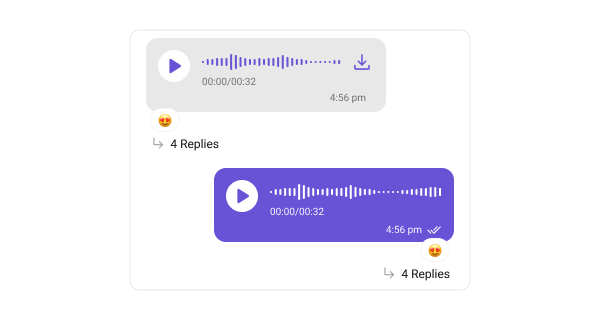
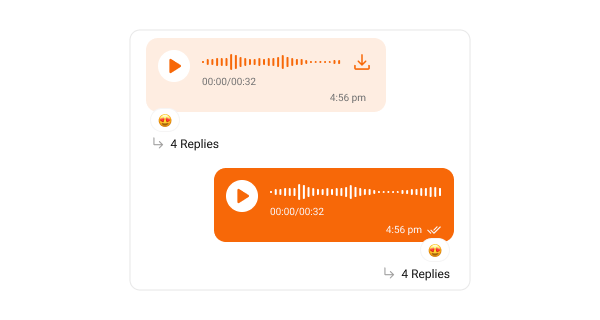
Audio bubbles display audio messages.
The following code snippet shows how to customize the audio message bubble:
```swift lines theme={null}
// Customize audio bubble for incoming messages
CometChatMessageBubble.style.incoming.audioBubbleStyle.audioWaveFormTintColor = UIColor(hexString: "#F76808")
CometChatMessageBubble.style.incoming.audioBubbleStyle.playImageTintColor = UIColor(hexString: "#F76808")
CometChatMessageBubble.style.incoming.audioBubbleStyle.backgroundColor = UIColor(hexString: "#FEEDE1")
// Customize audio bubble for outgoing messages
CometChatMessageBubble.style.outgoing.audioBubbleStyle.playImageTintColor = UIColor(hexString: "#F76808")
CometChatMessageBubble.style.outgoing.audioBubbleStyle.backgroundColor = UIColor(hexString: "#F76808")
```
**Default**
***
## Audio Bubble
Audio bubbles display audio messages.
The following code snippet shows how to customize the audio message bubble:
```swift lines theme={null}
// Customize audio bubble for incoming messages
CometChatMessageBubble.style.incoming.audioBubbleStyle.audioWaveFormTintColor = UIColor(hexString: "#F76808")
CometChatMessageBubble.style.incoming.audioBubbleStyle.playImageTintColor = UIColor(hexString: "#F76808")
CometChatMessageBubble.style.incoming.audioBubbleStyle.backgroundColor = UIColor(hexString: "#FEEDE1")
// Customize audio bubble for outgoing messages
CometChatMessageBubble.style.outgoing.audioBubbleStyle.playImageTintColor = UIColor(hexString: "#F76808")
CometChatMessageBubble.style.outgoing.audioBubbleStyle.backgroundColor = UIColor(hexString: "#F76808")
```
**Default**
 **Customization**
 ***
## Media Grid Bubble
Media grid bubbles render messages that carry **multiple image or video attachments** as a count-based grid (1, 2, 3, 4, or 5+ tiles). When there are more items than visible tiles, the last tile shows a "+N" overflow badge; video tiles carry a play badge and duration pill. Tapping any tile opens the fullscreen media viewer with swipe navigation, pinch-to-zoom, inline video playback, per-photo download, and share.
***
## Media Grid Bubble
Media grid bubbles render messages that carry **multiple image or video attachments** as a count-based grid (1, 2, 3, 4, or 5+ tiles). When there are more items than visible tiles, the last tile shows a "+N" overflow badge; video tiles carry a play badge and duration pill. Tapping any tile opens the fullscreen media viewer with swipe navigation, pinch-to-zoom, inline video playback, per-photo download, and share.
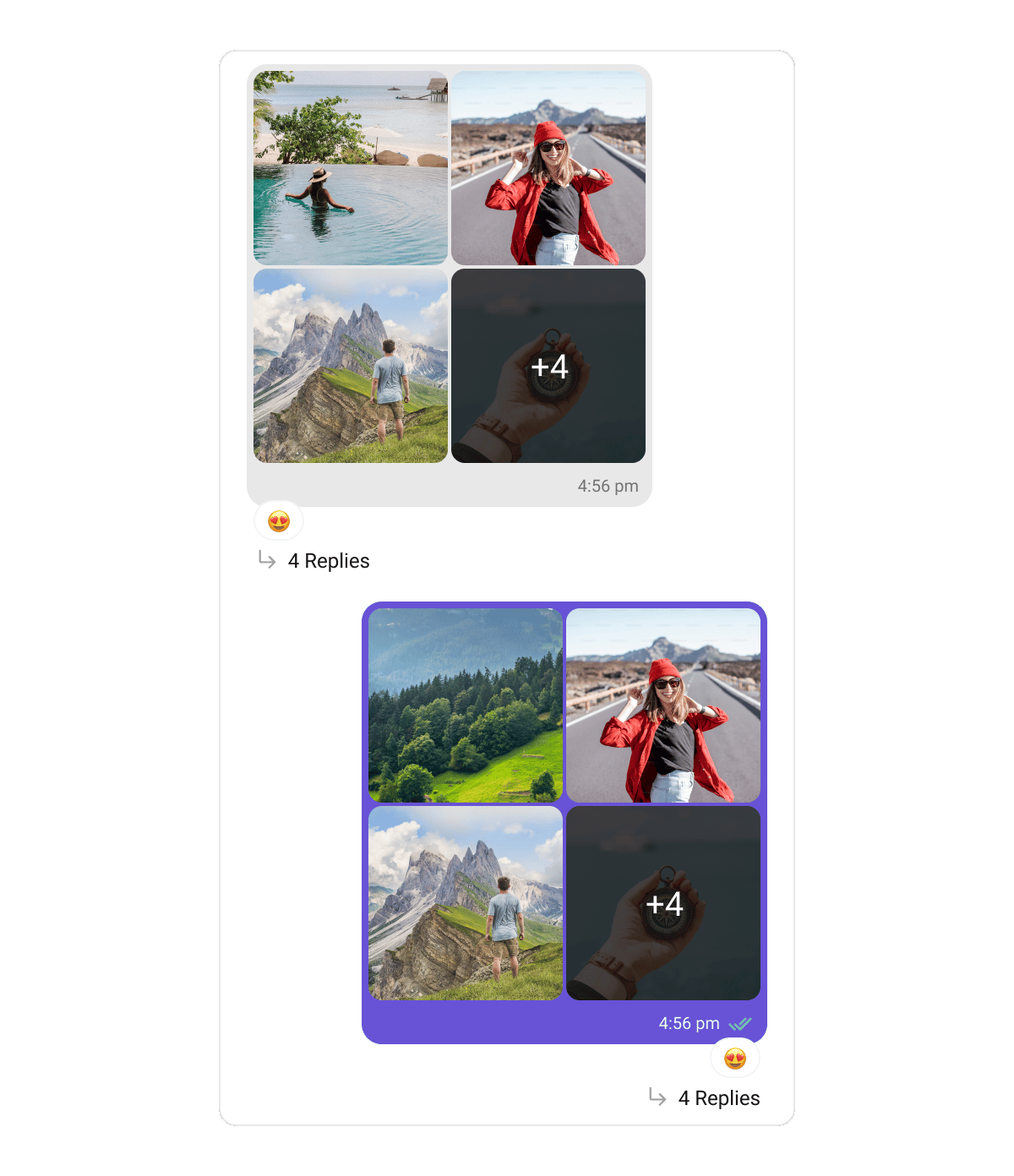
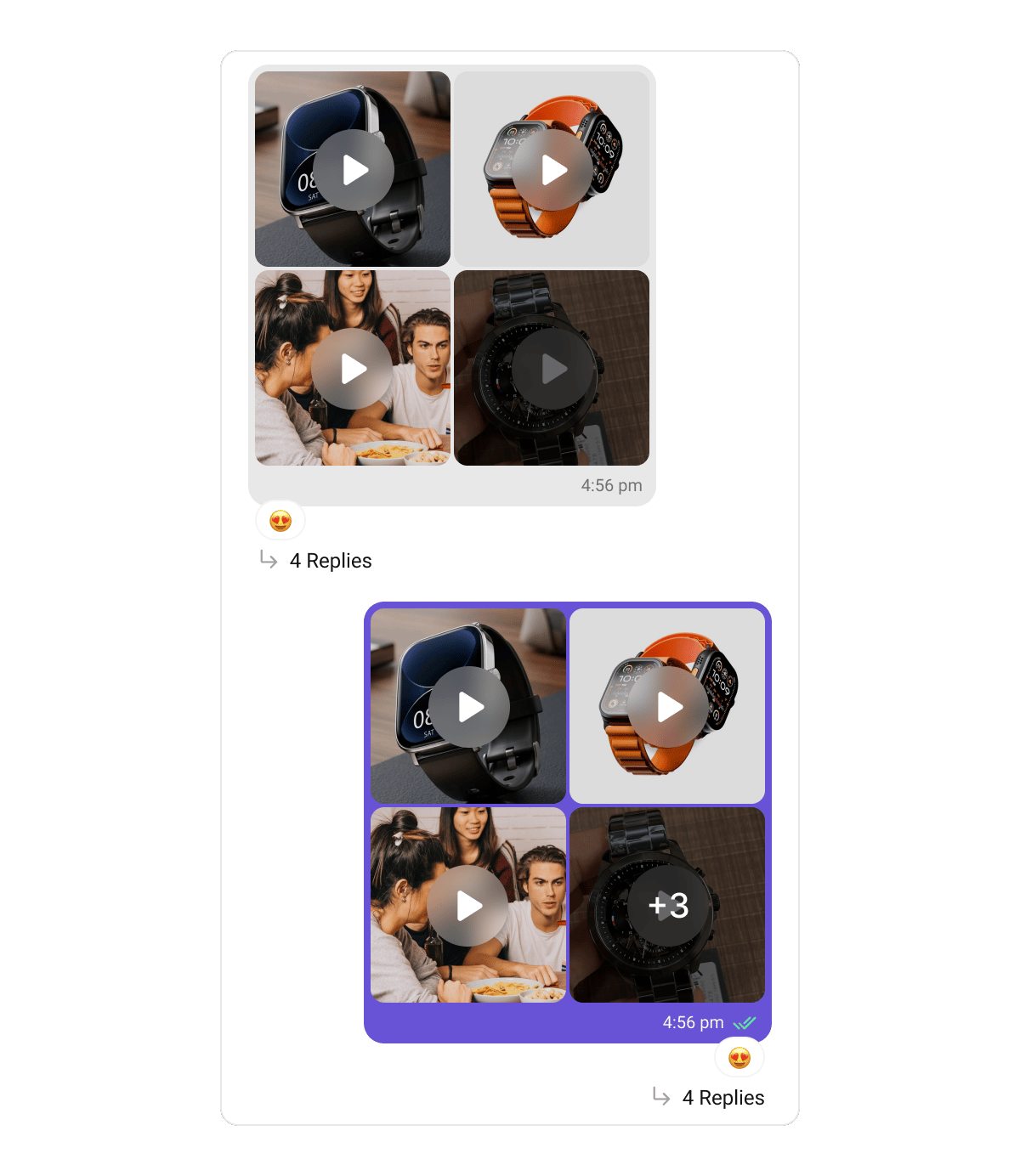 Grid layout and colors come from `GalleryBubbleStyle`:
```swift lines theme={null}
var style = GalleryBubbleStyle()
style.gridSpacing = 4
style.tileCornerRadius = 8
style.overflowOverlayColor = UIColor.black.withAlphaComponent(0.6)
style.playIconTint = .white
```
Key `GalleryBubbleStyle` properties for the grid:
| Property | Type | Description |
| ------------------------------------------ | -------------------- | --------------------------------------------------------------------------------------------------------------------------------------------------- |
| `bubbleWidth` | `CGFloat` | Content width of the media grid — screen-relative (≈62% of screen width, clamped 210–300) so the bubble keeps its proportion across iPhone and iPad |
| `gridSpacing` | `CGFloat` | Gap between tiles |
| `containerCornerRadius` | `CGFloat` | Corner radius of the whole grid container |
| `tileCornerRadius` | `CGFloat` | Corner radius of each media tile |
| `singleAspectRatio` | `CGFloat` | Height/width ratio when a single item is shown full width |
| `placeholderColor` | `UIColor` | Shown while a tile's media loads |
| `overflowOverlayColor` | `UIColor` | Dark scrim over the last tile when items overflow |
| `overflowTextColor` / `overflowTextFont` | `UIColor` / `UIFont` | The "+N" overflow label |
| `playIconTint` / `playIconBackgroundColor` | `UIColor` | The play badge on video tiles |
***
## Audio Files Bubble
Audio files bubbles render messages carrying **audio file attachments** — one playback row per file, with a play/pause button, a seekable progress slider, the duration, the file name, and a download control. Only one row plays at a time.
Grid layout and colors come from `GalleryBubbleStyle`:
```swift lines theme={null}
var style = GalleryBubbleStyle()
style.gridSpacing = 4
style.tileCornerRadius = 8
style.overflowOverlayColor = UIColor.black.withAlphaComponent(0.6)
style.playIconTint = .white
```
Key `GalleryBubbleStyle` properties for the grid:
| Property | Type | Description |
| ------------------------------------------ | -------------------- | --------------------------------------------------------------------------------------------------------------------------------------------------- |
| `bubbleWidth` | `CGFloat` | Content width of the media grid — screen-relative (≈62% of screen width, clamped 210–300) so the bubble keeps its proportion across iPhone and iPad |
| `gridSpacing` | `CGFloat` | Gap between tiles |
| `containerCornerRadius` | `CGFloat` | Corner radius of the whole grid container |
| `tileCornerRadius` | `CGFloat` | Corner radius of each media tile |
| `singleAspectRatio` | `CGFloat` | Height/width ratio when a single item is shown full width |
| `placeholderColor` | `UIColor` | Shown while a tile's media loads |
| `overflowOverlayColor` | `UIColor` | Dark scrim over the last tile when items overflow |
| `overflowTextColor` / `overflowTextFont` | `UIColor` / `UIFont` | The "+N" overflow label |
| `playIconTint` / `playIconBackgroundColor` | `UIColor` | The play badge on video tiles |
***
## Audio Files Bubble
Audio files bubbles render messages carrying **audio file attachments** — one playback row per file, with a play/pause button, a seekable progress slider, the duration, the file name, and a download control. Only one row plays at a time.
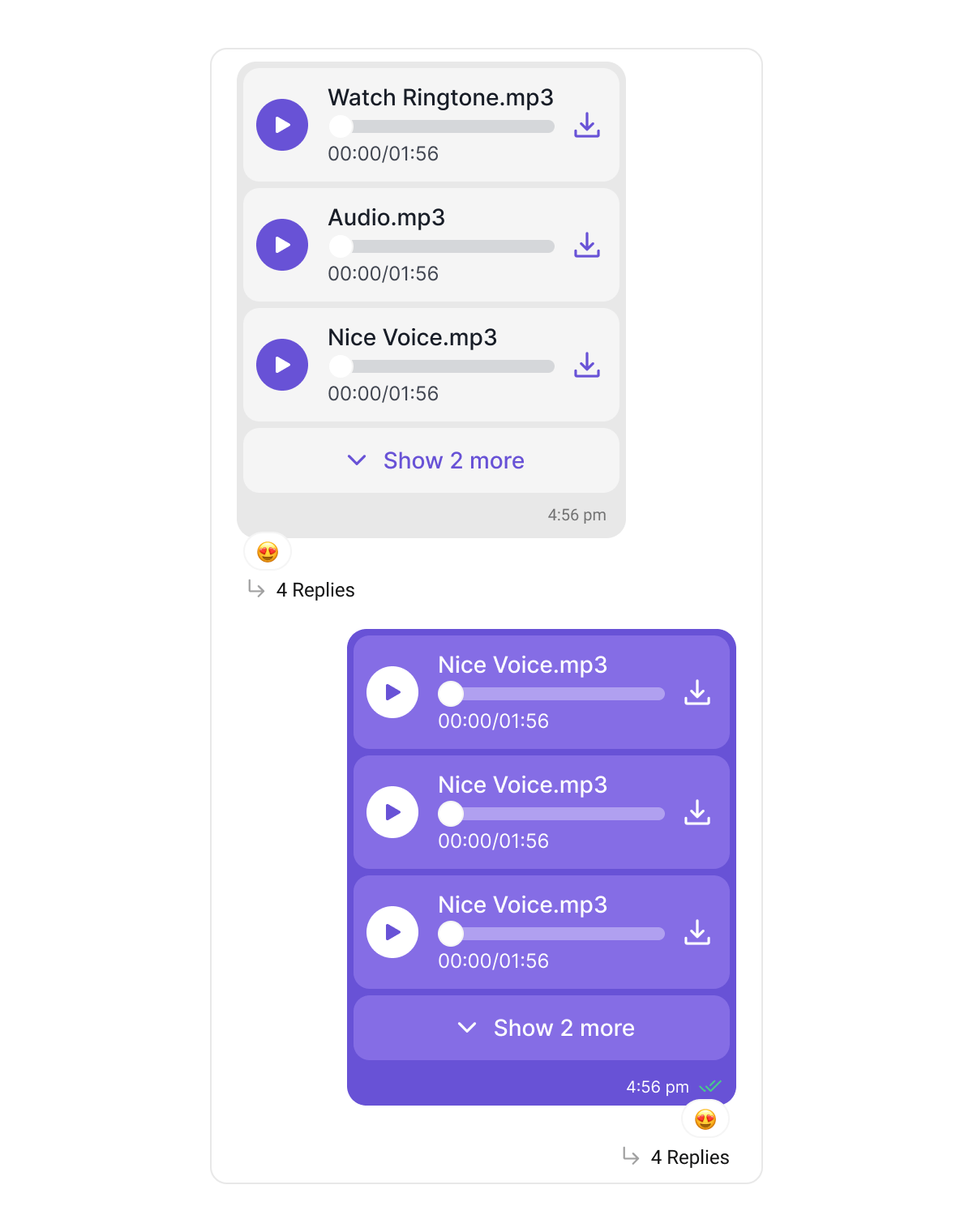 This bubble is distinct from the [Audio Bubble](#audio-bubble) above, which renders **voice notes** recorded with the composer's microphone. Voice notes keep their waveform look and are never grouped with other attachments.
Audio rows share the caption and section styling of `GalleryBubbleStyle` (`sectionSpacing`, `captionFont`, `captionColor`), and flip their colors automatically on outgoing bubbles.
***
## Files Bubble
Files bubbles render messages carrying **document attachments** as a connected stack of file cards — each with a file-type icon (PDF, Word, Excel, PowerPoint, ZIP, …), the file name, and its metadata. Four or more files collapse behind a "+N more" toggle. Tapping a card opens the file: a downloaded copy previews in-app, otherwise the file is offered through the share sheet.
This bubble is distinct from the [Audio Bubble](#audio-bubble) above, which renders **voice notes** recorded with the composer's microphone. Voice notes keep their waveform look and are never grouped with other attachments.
Audio rows share the caption and section styling of `GalleryBubbleStyle` (`sectionSpacing`, `captionFont`, `captionColor`), and flip their colors automatically on outgoing bubbles.
***
## Files Bubble
Files bubbles render messages carrying **document attachments** as a connected stack of file cards — each with a file-type icon (PDF, Word, Excel, PowerPoint, ZIP, …), the file name, and its metadata. Four or more files collapse behind a "+N more" toggle. Tapping a card opens the file: a downloaded copy previews in-app, otherwise the file is offered through the share sheet.
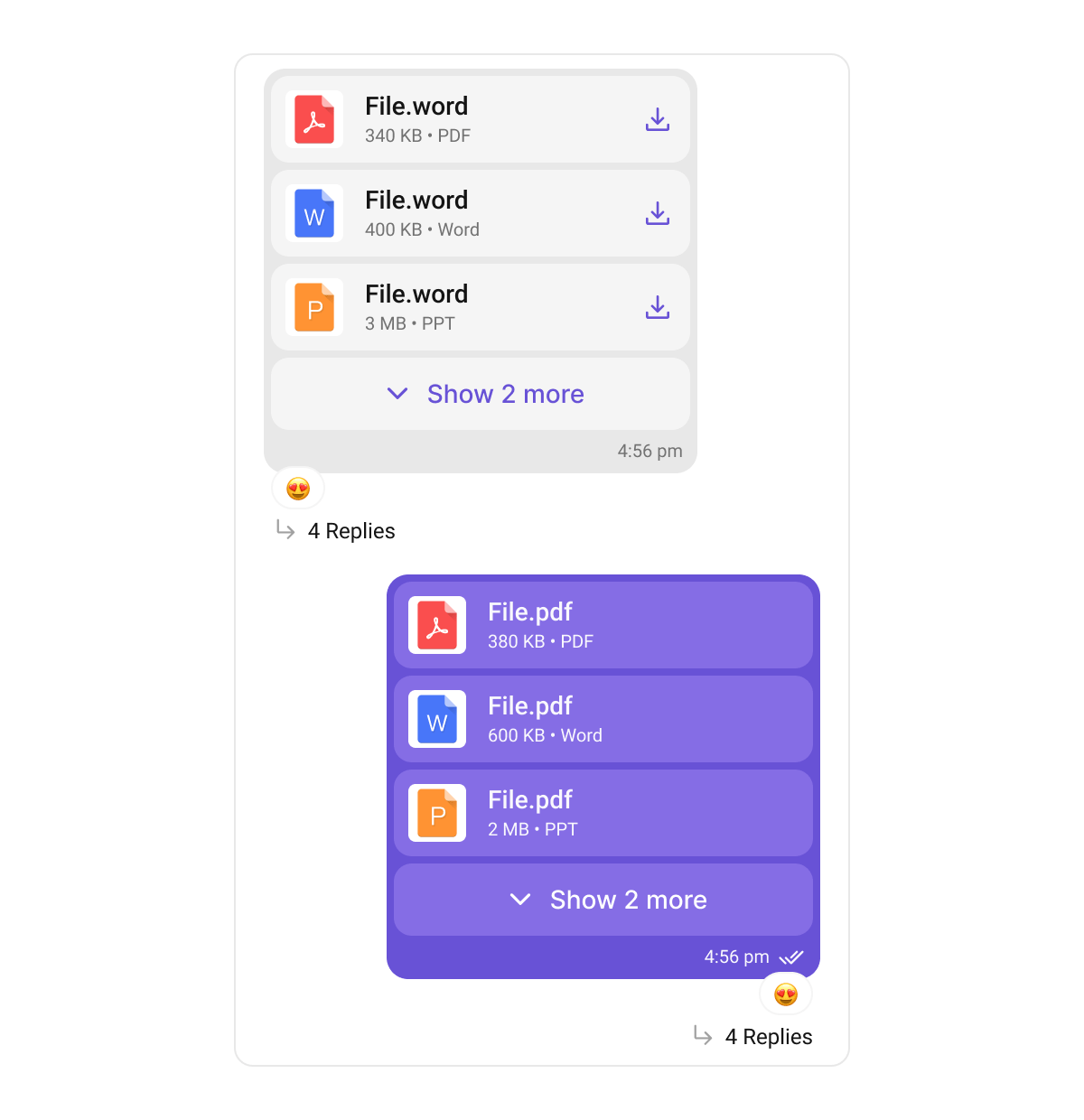 File card styling comes from `GalleryBubbleStyle`:
```swift lines theme={null}
var style = GalleryBubbleStyle()
style.fileCardBackgroundColor = UIColor(hexString: "#FEEDE1")
style.fileNameFont = .systemFont(ofSize: 15, weight: .semibold)
style.expandButtonColor = UIColor(hexString: "#F76808")
```
Key `GalleryBubbleStyle` properties for file cards and the shared caption row:
| Property | Type | Description |
| ---------------------------------------- | -------------------- | ----------------------------------------------------------------- |
| `fileCardBackgroundColor` | `UIColor` | Background of each file card |
| `fileCardSpacing` | `CGFloat` | Gap between cards in the stack |
| `fileIconTint` | `UIColor` | Tint of the file-type icon |
| `fileNameFont` / `fileNameColor` | `UIFont` / `UIColor` | File name text |
| `fileMetaFont` / `fileMetaColor` | `UIFont` / `UIColor` | File size/type metadata text |
| `expandButtonFont` / `expandButtonColor` | `UIFont` / `UIColor` | The "+N more" / "Show less" toggle |
| `sectionSpacing` | `CGFloat` | Vertical spacing between media, audio, files and caption sections |
| `captionFont` / `captionColor` | `UIFont` / `UIColor` | The shared caption row under the attachments |
| `captionDividerColor` | `UIColor` | The divider line above the caption |
Captions containing rich text (code blocks, quote blocks, inline code) render through the same pipeline as [Text Bubbles](#text-bubble), so their formatting looks identical across message types.
***
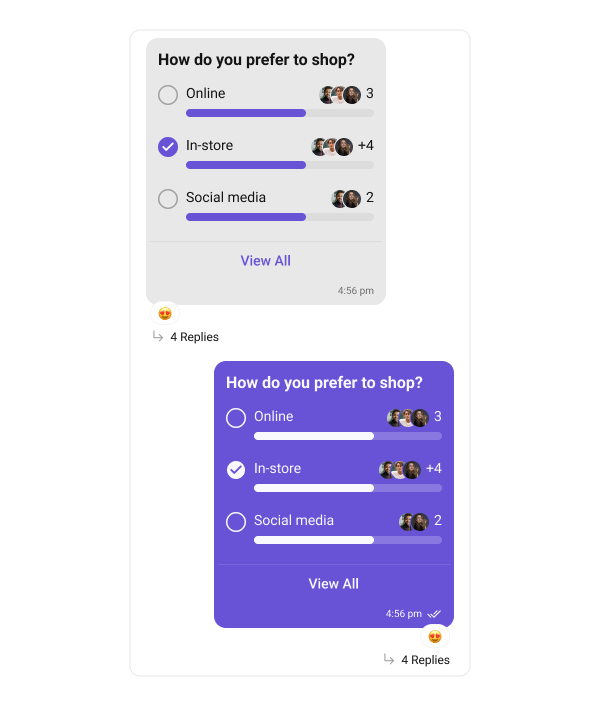
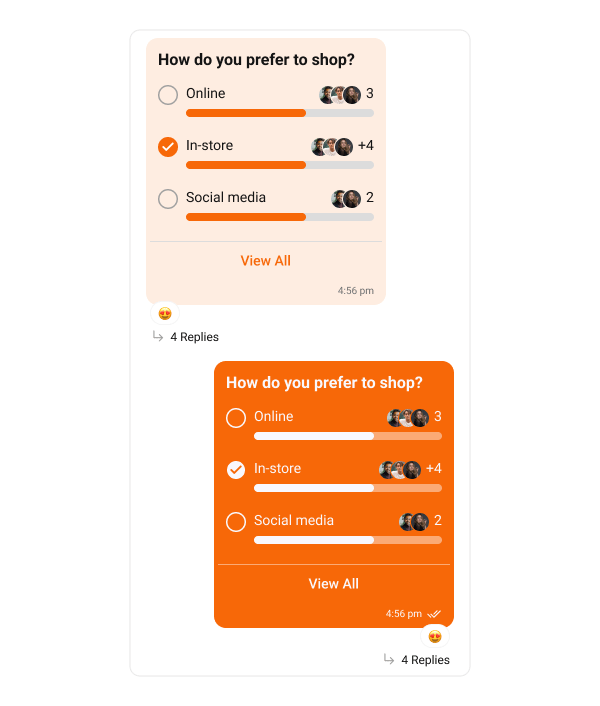
## Poll Bubble
Poll bubbles display messages with polling options.
The following code snippet shows how to customize the poll message bubble:
```swift lines theme={null}
// Customize poll bubble for incoming messages
CometChatMessageBubble.style.incoming.pollBubbleStyle.optionProgressTintColor = UIColor(hexString: "#F76808")
CometChatMessageBubble.style.incoming.pollBubbleStyle.selectedPollImageTint = UIColor(hexString: "#F76808")
CometChatMessageBubble.style.incoming.pollBubbleStyle.backgroundColor = UIColor(hexString: "#FEEDE1")
// Customize poll bubble for outgoing messages
CometChatMessageBubble.style.outgoing.pollBubbleStyle.backgroundColor = UIColor(hexString: "#F76808")
```
**Default**
File card styling comes from `GalleryBubbleStyle`:
```swift lines theme={null}
var style = GalleryBubbleStyle()
style.fileCardBackgroundColor = UIColor(hexString: "#FEEDE1")
style.fileNameFont = .systemFont(ofSize: 15, weight: .semibold)
style.expandButtonColor = UIColor(hexString: "#F76808")
```
Key `GalleryBubbleStyle` properties for file cards and the shared caption row:
| Property | Type | Description |
| ---------------------------------------- | -------------------- | ----------------------------------------------------------------- |
| `fileCardBackgroundColor` | `UIColor` | Background of each file card |
| `fileCardSpacing` | `CGFloat` | Gap between cards in the stack |
| `fileIconTint` | `UIColor` | Tint of the file-type icon |
| `fileNameFont` / `fileNameColor` | `UIFont` / `UIColor` | File name text |
| `fileMetaFont` / `fileMetaColor` | `UIFont` / `UIColor` | File size/type metadata text |
| `expandButtonFont` / `expandButtonColor` | `UIFont` / `UIColor` | The "+N more" / "Show less" toggle |
| `sectionSpacing` | `CGFloat` | Vertical spacing between media, audio, files and caption sections |
| `captionFont` / `captionColor` | `UIFont` / `UIColor` | The shared caption row under the attachments |
| `captionDividerColor` | `UIColor` | The divider line above the caption |
Captions containing rich text (code blocks, quote blocks, inline code) render through the same pipeline as [Text Bubbles](#text-bubble), so their formatting looks identical across message types.
***
## Poll Bubble
Poll bubbles display messages with polling options.
The following code snippet shows how to customize the poll message bubble:
```swift lines theme={null}
// Customize poll bubble for incoming messages
CometChatMessageBubble.style.incoming.pollBubbleStyle.optionProgressTintColor = UIColor(hexString: "#F76808")
CometChatMessageBubble.style.incoming.pollBubbleStyle.selectedPollImageTint = UIColor(hexString: "#F76808")
CometChatMessageBubble.style.incoming.pollBubbleStyle.backgroundColor = UIColor(hexString: "#FEEDE1")
// Customize poll bubble for outgoing messages
CometChatMessageBubble.style.outgoing.pollBubbleStyle.backgroundColor = UIColor(hexString: "#F76808")
```
**Default**
 **Customization**
 ***
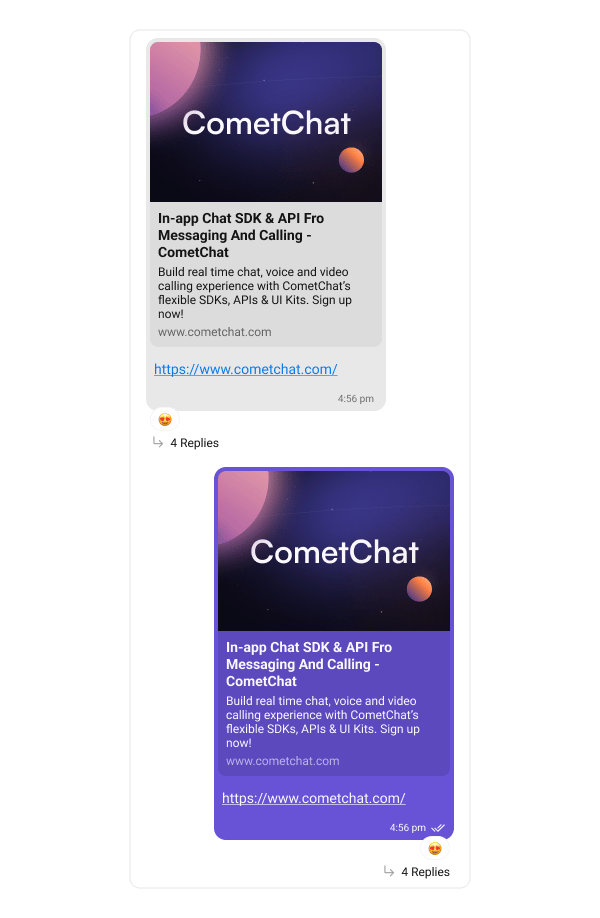
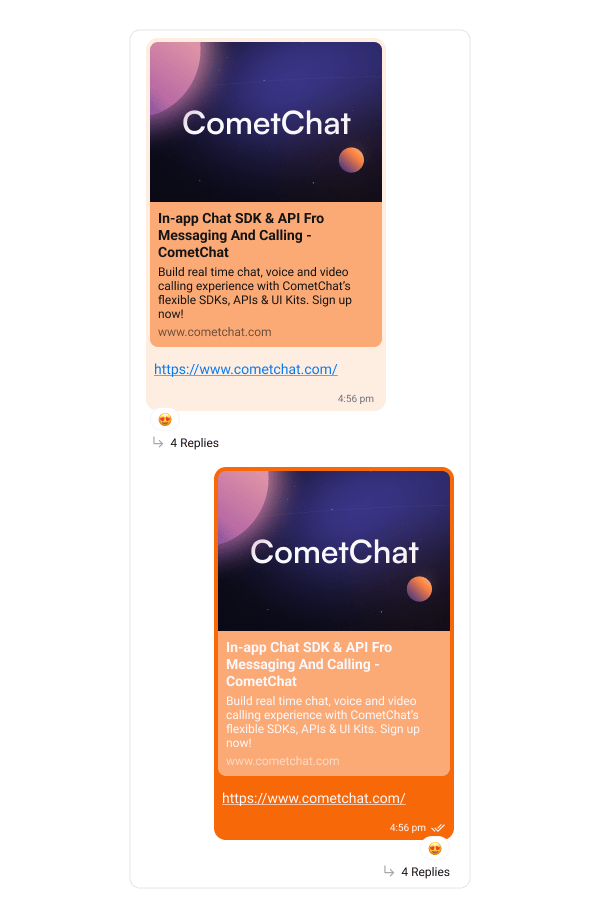
## Link Preview Bubble
The Link Preview Bubble displays a preview of links shared in messages. It enriches the messaging experience by showing details such as the page title, description, and an image from the linked content, making links more engaging and informative.
The following code snippet shows how to customize the link preview message bubble:
```swift lines theme={null}
// Customize link preview bubble for incoming messages
CometChatMessageBubble.style.incoming.linkPreviewBubbleStyle.backgroundColor = UIColor(hexString: "#FEEDE1")
// Customize link preview bubble for outgoing messages
CometChatMessageBubble.style.outgoing.linkPreviewBubbleStyle.backgroundColor = UIColor(hexString: "#F76808")
```
**Default**
***
## Link Preview Bubble
The Link Preview Bubble displays a preview of links shared in messages. It enriches the messaging experience by showing details such as the page title, description, and an image from the linked content, making links more engaging and informative.
The following code snippet shows how to customize the link preview message bubble:
```swift lines theme={null}
// Customize link preview bubble for incoming messages
CometChatMessageBubble.style.incoming.linkPreviewBubbleStyle.backgroundColor = UIColor(hexString: "#FEEDE1")
// Customize link preview bubble for outgoing messages
CometChatMessageBubble.style.outgoing.linkPreviewBubbleStyle.backgroundColor = UIColor(hexString: "#F76808")
```
**Default**
 **Customization**
 ***
## Action Bubble
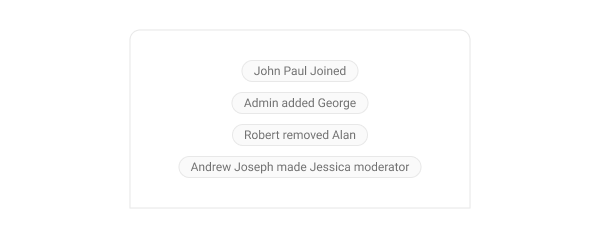
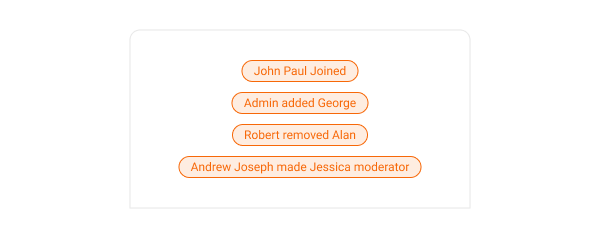
Action bubbles provide a customizable interface for displaying a variety of actions, such as group actions, within a chat.
The following code snippet shows how to customize the action message bubble:
```swift lines theme={null}
// Customize action bubble appearance
CometChatMessageBubble.actionBubbleStyle.backgroundColor = UIColor(hexString: "#FEEDE1")
CometChatMessageBubble.actionBubbleStyle.bubbleTextColor = UIColor(hexString: "#F76808")
CometChatMessageBubble.actionBubbleStyle.borderColor = UIColor(hexString: "#F76808")
```
**Default**
***
## Action Bubble
Action bubbles provide a customizable interface for displaying a variety of actions, such as group actions, within a chat.
The following code snippet shows how to customize the action message bubble:
```swift lines theme={null}
// Customize action bubble appearance
CometChatMessageBubble.actionBubbleStyle.backgroundColor = UIColor(hexString: "#FEEDE1")
CometChatMessageBubble.actionBubbleStyle.bubbleTextColor = UIColor(hexString: "#F76808")
CometChatMessageBubble.actionBubbleStyle.borderColor = UIColor(hexString: "#F76808")
```
**Default**
 **Customization**
 ***
## Delete Bubble
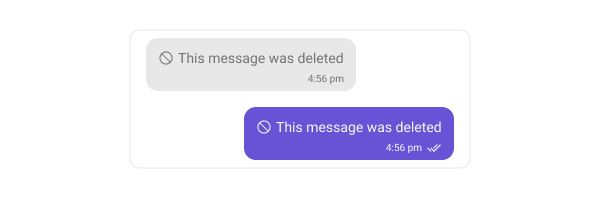
Delete bubbles display messages that have been deleted by the sender. These indicate the message removal within the chat interface.
The following code snippet shows how to customize the delete message bubble:
```swift lines theme={null}
// Customize delete bubble for incoming messages
CometChatMessageBubble.style.incoming.deleteBubbleStyle.backgroundColor = UIColor(hexString: "#FEEDE1")
// Customize delete bubble for outgoing messages
CometChatMessageBubble.style.outgoing.deleteBubbleStyle.backgroundColor = UIColor(hexString: "#F76808")
```
**Default**
***
## Delete Bubble
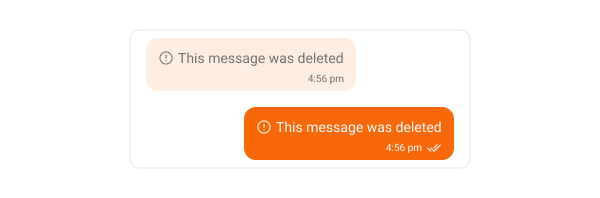
Delete bubbles display messages that have been deleted by the sender. These indicate the message removal within the chat interface.
The following code snippet shows how to customize the delete message bubble:
```swift lines theme={null}
// Customize delete bubble for incoming messages
CometChatMessageBubble.style.incoming.deleteBubbleStyle.backgroundColor = UIColor(hexString: "#FEEDE1")
// Customize delete bubble for outgoing messages
CometChatMessageBubble.style.outgoing.deleteBubbleStyle.backgroundColor = UIColor(hexString: "#F76808")
```
**Default**
 **Customization**
 ***
## AI Assistant Bubble
The AI Assistant Bubble displays responses or messages sent by the AI assistant within the chat interface. These bubbles are designed to visually distinguish AI-generated messages from user messages, maintaining a clear and intuitive conversation flow.
You can customize the appearance of the AI Assistant message bubble to match your app's theme — including background color, text color, font, and border styling.
The following code snippet shows how to customize the AI Assistant message bubble:
```swift lines theme={null}
// Customize AI assistant bubble for incoming messages
CometChatMessageBubble.style.incoming.aiAssistantBubbleStyle.backgroundColor = UIColor(hexString: "#FEEDE1")
// Customize AI assistant bubble for outgoing messages
CometChatMessageBubble.style.outgoing.aiAssistantBubbleStyle.backgroundColor = UIColor(hexString: "#F76808")
```
***
## Next Steps
Display and customize the message list component
Customize the message input component
Learn about global styling options
***
## AI Assistant Bubble
The AI Assistant Bubble displays responses or messages sent by the AI assistant within the chat interface. These bubbles are designed to visually distinguish AI-generated messages from user messages, maintaining a clear and intuitive conversation flow.
You can customize the appearance of the AI Assistant message bubble to match your app's theme — including background color, text color, font, and border styling.
The following code snippet shows how to customize the AI Assistant message bubble:
```swift lines theme={null}
// Customize AI assistant bubble for incoming messages
CometChatMessageBubble.style.incoming.aiAssistantBubbleStyle.backgroundColor = UIColor(hexString: "#FEEDE1")
// Customize AI assistant bubble for outgoing messages
CometChatMessageBubble.style.outgoing.aiAssistantBubbleStyle.backgroundColor = UIColor(hexString: "#F76808")
```
***
## Next Steps
Display and customize the message list component
Customize the message input component
Learn about global styling options